 Maplace.js
Place cards in popups
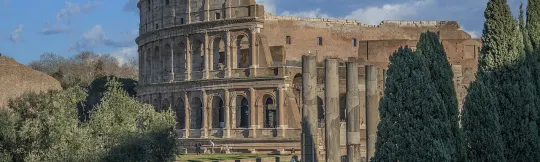
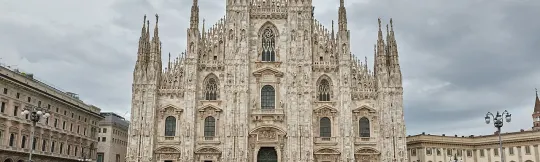
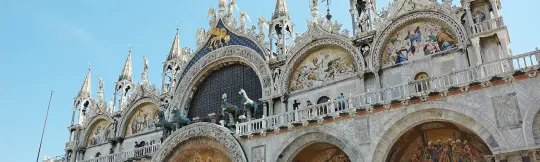
A place card in each popup: photo, rating, hours, and buttons to open it in Maps or get there.
Map and code
Loading the map…
The map couldn't load.
Loading the map…
The map couldn't load.
Loading the map…
The map couldn't load.
Loading the map…
The map couldn't load.
Loading the map…
The map couldn't load.
Loading the map…
The map couldn't load.
Loading the map…
The map couldn't load.
Loading the map…
The map couldn't load.
These maps come from Google Maps and OpenFreeMap, which see your IP address. They stay off until you say so, once for the whole site. What loading the maps sends
Styled by popups.css
<!doctype html>
<script src="https://cdn.jsdelivr.net/npm/@maplacejs/maplace@1/dist/maplace-element-maplibre.iife.js"></script>
<!-- This example's look lives in the examples' styles/popups.css, which every version links. -->
<link rel="stylesheet" href="../../styles/popups.css">
<!-- A place card in each popup, from each place's template: photo, category, hours and rating,
     then the Open in Maps and Directions links. The ratings, reviews and hours are sample figures. -->
<maplace-map id="popups-maplibre-map" center="44,11" zoom="6" open-in-maps-link directions-link>
  <maplace-location location-id="colosseum" lat="41.8902" lng="12.4922" title="Colosseum">
    <template>
      <div class="place-card">
        <img class="place-photo" src="/examples/data/photos/colosseum.webp" alt="The Colosseum's arches behind a row of cypresses">
        <p class="place-meta"><span class="place-category">Landmark</span> · Open <span class="place-hours">9:00–19:15</span></p>
        <p class="place-rating">★ <span class="place-score">4.7</span> <span class="place-reviews">(412,301 reviews)</span></p>
      </div>
    </template>
  </maplace-location>
  <maplace-location location-id="duomo" lat="45.4641" lng="9.1919" title="Duomo di Milano">
    <template>
      <div class="place-card">
        <img class="place-photo" src="/examples/data/photos/duomo.webp" alt="The Duomo's white Gothic facade over its square">
        <p class="place-meta"><span class="place-category">Cathedral</span> · Open <span class="place-hours">9:00–19:00</span></p>
        <p class="place-rating">★ <span class="place-score">4.8</span> <span class="place-reviews">(198,442 reviews)</span></p>
      </div>
    </template>
  </maplace-location>
  <maplace-location location-id="st-marks" lat="45.4345" lng="12.3397" title="St Mark's Basilica">
    <template>
      <div class="place-card">
        <img class="place-photo" src="/examples/data/photos/st-marks.webp" alt="The mosaics and domes of St Mark's Basilica's facade">
        <p class="place-meta"><span class="place-category">Basilica</span> · Open <span class="place-hours">9:30–17:15</span></p>
        <p class="place-rating">★ <span class="place-score">4.7</span> <span class="place-reviews">(156,018 reviews)</span></p>
      </div>
    </template>
  </maplace-location>
</maplace-map><!doctype html>
<script src="https://cdn.jsdelivr.net/npm/@maplacejs/maplace@1/dist/maplace-element.iife.js"></script>
<!-- This example's look lives in the examples' styles/popups.css, which every version links. -->
<link rel="stylesheet" href="../styles/popups.css">
<!-- A place card in each popup, from each place's template: photo, category, hours and rating,
then the Open in Maps and Directions links. The ratings, reviews and hours are sample figures. -->
<maplace-map id="popups-map" api-key="YOUR_KEY" center="44,11" zoom="6" open-in-maps-link directions-link>
<maplace-location location-id="colosseum" lat="41.8902" lng="12.4922" title="Colosseum">
<template>
<div class="place-card">
<img class="place-photo" src="/examples/data/photos/colosseum.webp" alt="The Colosseum's arches behind a row of cypresses">
<p class="place-meta"><span class="place-category">Landmark</span> · Open <span class="place-hours">9:00–19:15</span></p>
<p class="place-rating">★ <span class="place-score">4.7</span> <span class="place-reviews">(412,301 reviews)</span></p>
</div>
</template>
</maplace-location>
<maplace-location location-id="duomo" lat="45.4641" lng="9.1919" title="Duomo di Milano">
<template>
<div class="place-card">
<img class="place-photo" src="/examples/data/photos/duomo.webp" alt="The Duomo's white Gothic facade over its square">
<p class="place-meta"><span class="place-category">Cathedral</span> · Open <span class="place-hours">9:00–19:00</span></p>
<p class="place-rating">★ <span class="place-score">4.8</span> <span class="place-reviews">(198,442 reviews)</span></p>
</div>
</template>
</maplace-location>
<maplace-location location-id="st-marks" lat="45.4345" lng="12.3397" title="St Mark's Basilica">
<template>
<div class="place-card">
<img class="place-photo" src="/examples/data/photos/st-marks.webp" alt="The mosaics and domes of St Mark's Basilica's facade">
<p class="place-meta"><span class="place-category">Basilica</span> · Open <span class="place-hours">9:30–17:15</span></p>
<p class="place-rating">★ <span class="place-score">4.7</span> <span class="place-reviews">(156,018 reviews)</span></p>
</div>
</template>
</maplace-location>
</maplace-map><!doctype html>
<!-- A page of your own script: the MapLibre CDN script, which bundles maplibre-gl and its stylesheet, what the map mounts on, and the map made with Maplace. -->
<script src="https://cdn.jsdelivr.net/npm/@maplacejs/maplace@1/dist/maplace-element-maplibre.iife.js"></script>
<!-- This example's look lives in the examples' styles/popups.css, which every version links. -->
<link rel="stylesheet" href="../../styles/popups.css">
<style>
#popups-maplibre-script-map { height: 24rem; }
</style>
<div id="popups-maplibre-script-map"></div>
<template id="popups-maplibre-script-card">
<div class="place-card">
<img class="place-photo" alt="">
<p class="place-meta"><span class="place-category"></span> · Open <span class="place-hours"></span></p>
<p class="place-rating">★ <span class="place-score"></span> <span class="place-reviews"></span></p>
</div>
</template>
<script type="module">
// The ratings, reviews and hours are sample figures.
const places = [
{
id: "colosseum",
lat: 41.8902,
lng: 12.4922,
title: "Colosseum",
data: {
photo: "/examples/data/photos/colosseum.webp",
alt: "The Colosseum's arches behind a row of cypresses",
category: "Landmark",
rating: "4.7",
reviews: "412,301",
hours: "9:00–19:15",
},
},
{
id: "duomo",
lat: 45.4641,
lng: 9.1919,
title: "Duomo di Milano",
data: {
photo: "/examples/data/photos/duomo.webp",
alt: "The Duomo's white Gothic facade over its square",
category: "Cathedral",
rating: "4.8",
reviews: "198,442",
hours: "9:00–19:00",
},
},
{
id: "st-marks",
lat: 45.4345,
lng: 12.3397,
title: "St Mark's Basilica",
data: {
photo: "/examples/data/photos/st-marks.webp",
alt: "The mosaics and domes of St Mark's Basilica's facade",
category: "Basilica",
rating: "4.7",
reviews: "156,018",
hours: "9:30–17:15",
},
},
];
Maplace.createMapLibreMap("#popups-maplibre-script-map", {
locations: places.map((place) => ({ ...place, content: () => placeCard(place.data) })),
view: { kind: "center", center: { lat: 44, lng: 11 }, zoom: 6 },
popup: { openInMapsLink: true, directionsLink: true },
});
/** A place's card: the page's template, filled with its photo, category, hours and rating. */
function placeCard(place) {
const template = document.querySelector("#popups-maplibre-script-card");
const card = template.content.cloneNode(true);
const photo = card.querySelector(".place-photo");
photo.src = place.photo;
photo.alt = place.alt;
const write = (name, text) => {
card.querySelector(`.place-${name}`).textContent = text;
};
write("category", place.category);
write("hours", place.hours);
write("score", place.rating);
write("reviews", `(${place.reviews} reviews)`);
return card;
}
</script><!doctype html>
<!-- A page of your own script: the CDN script, what the map mounts on, and the map made with Maplace, which adds Maps JS with your key. -->
<script src="https://cdn.jsdelivr.net/npm/@maplacejs/maplace@1/dist/maplace-element.iife.js"></script>
<!-- This example's look lives in the examples' styles/popups.css, which every version links. -->
<link rel="stylesheet" href="../styles/popups.css">
<style>
#popups-script-map { height: 24rem; }
</style>
<div id="popups-script-map"></div>
<template id="popups-script-card">
<div class="place-card">
<img class="place-photo" alt="">
<p class="place-meta"><span class="place-category"></span> · Open <span class="place-hours"></span></p>
<p class="place-rating">★ <span class="place-score"></span> <span class="place-reviews"></span></p>
</div>
</template>
<script type="module">
// The ratings, reviews and hours are sample figures.
const places = [
{
id: "colosseum",
lat: 41.8902,
lng: 12.4922,
title: "Colosseum",
data: {
photo: "/examples/data/photos/colosseum.webp",
alt: "The Colosseum's arches behind a row of cypresses",
category: "Landmark",
rating: "4.7",
reviews: "412,301",
hours: "9:00–19:15",
},
},
{
id: "duomo",
lat: 45.4641,
lng: 9.1919,
title: "Duomo di Milano",
data: {
photo: "/examples/data/photos/duomo.webp",
alt: "The Duomo's white Gothic facade over its square",
category: "Cathedral",
rating: "4.8",
reviews: "198,442",
hours: "9:00–19:00",
},
},
{
id: "st-marks",
lat: 45.4345,
lng: 12.3397,
title: "St Mark's Basilica",
data: {
photo: "/examples/data/photos/st-marks.webp",
alt: "The mosaics and domes of St Mark's Basilica's facade",
category: "Basilica",
rating: "4.7",
reviews: "156,018",
hours: "9:30–17:15",
},
},
];
Maplace.createGoogleMap("#popups-script-map", {
apiKey: "YOUR_KEY",
locations: places.map((place) => ({ ...place, content: () => placeCard(place.data) })),
view: { kind: "center", center: { lat: 44, lng: 11 }, zoom: 6 },
popup: { openInMapsLink: true, directionsLink: true },
});
/** A place's card: the page's template, filled with its photo, category, hours and rating. */
function placeCard(place) {
const template = document.querySelector("#popups-script-card");
const card = template.content.cloneNode(true);
const photo = card.querySelector(".place-photo");
photo.src = place.photo;
photo.alt = place.alt;
const write = (name, text) => {
card.querySelector(`.place-${name}`).textContent = text;
};
write("category", place.category);
write("hours", place.hours);
write("score", place.rating);
write("reviews", `(${place.reviews} reviews)`);
return card;
}
</script><!doctype html>
<!-- The page vanilla.ts runs on: what the module mounts on, and the module, which brings maplibre-gl and its stylesheet. -->
<!-- This example's look lives in the examples' styles/popups.css, which every version links. -->
<link rel="stylesheet" href="../../styles/popups.css">
<style>
#popups-maplibre-vanilla-map { height: 24rem; }
</style>
<div id="popups-maplibre-vanilla-map"></div>
<template id="popups-maplibre-vanilla-card">
<div class="place-card">
<img class="place-photo" alt="">
<p class="place-meta"><span class="place-category"></span> · Open <span class="place-hours"></span></p>
<p class="place-rating">★ <span class="place-score"></span> <span class="place-reviews"></span></p>
</div>
</template>
<script type="module" src="./vanilla.ts"></script>import "maplibre-gl/dist/maplibre-gl.css";
import { createMapLibreMap } from "@maplacejs/maplace/maplibre";
/** Your own fields, in each location's `data`. */
interface Place {
readonly photo: string;
readonly alt: string;
readonly category: string;
readonly rating: string;
readonly reviews: string;
readonly hours: string;
}
// The ratings, reviews and hours are sample figures.
const places = [
{
id: "colosseum",
lat: 41.8902,
lng: 12.4922,
title: "Colosseum",
data: {
photo: "/examples/data/photos/colosseum.webp",
alt: "The Colosseum's arches behind a row of cypresses",
category: "Landmark",
rating: "4.7",
reviews: "412,301",
hours: "9:00–19:15",
},
},
{
id: "duomo",
lat: 45.4641,
lng: 9.1919,
title: "Duomo di Milano",
data: {
photo: "/examples/data/photos/duomo.webp",
alt: "The Duomo's white Gothic facade over its square",
category: "Cathedral",
rating: "4.8",
reviews: "198,442",
hours: "9:00–19:00",
},
},
{
id: "st-marks",
lat: 45.4345,
lng: 12.3397,
title: "St Mark's Basilica",
data: {
photo: "/examples/data/photos/st-marks.webp",
alt: "The mosaics and domes of St Mark's Basilica's facade",
category: "Basilica",
rating: "4.7",
reviews: "156,018",
hours: "9:30–17:15",
},
},
];
createMapLibreMap("#popups-maplibre-vanilla-map", {
locations: places.map((place) => ({ ...place, content: () => placeCard(place.data) })),
view: { kind: "center", center: { lat: 44, lng: 11 }, zoom: 6 },
popup: { openInMapsLink: true, directionsLink: true },
});
/** A place's card: the page's template, filled with its photo, category, hours and rating. */
function placeCard(place: Place): Node {
const template = document.querySelector("#popups-maplibre-vanilla-card") as HTMLTemplateElement;
const card = template.content.cloneNode(true) as DocumentFragment;
const photo = card.querySelector(".place-photo") as HTMLImageElement;
photo.src = place.photo;
photo.alt = place.alt;
const write = (name: string, text: string) => {
(card.querySelector(`.place-${name}`) as HTMLElement).textContent = text;
};
write("category", place.category);
write("hours", place.hours);
write("score", place.rating);
write("reviews", `(${place.reviews} reviews)`);
return card;
}<!doctype html>
<!-- The page vanilla.ts runs on: Maps JS from Google's bootstrap loader, what the module mounts on, the module. -->Google's bootstrap loader, with your API key: from Google's docs
<script>
  (g=>{var h,a,k,p="The Google Maps JavaScript API",c="google",l="importLibrary",q="__ib__",m=document,b=window;b=b[c]||(b[c]={});var d=b.maps||(b.maps={}),r=new Set,e=new URLSearchParams,u=()=>h||(h=new Promise(async(f,n)=>{await (a=m.createElement("script"));e.set("libraries",[...r]+"");for(k in g)e.set(k.replace(/[A-Z]/g,t=>"_"+t[0].toLowerCase()),g[k]);e.set("callback",c+".maps."+q);a.src=`https://maps.${c}apis.com/maps/api/js?`+e;d[q]=f;a.onerror=()=>h=n(Error(p+" could not load."));a.nonce=m.querySelector("script[nonce]")?.nonce||"";m.head.append(a)}));d[l]?console.warn(p+" only loads once. Ignoring:",g):d[l]=(f,...n)=>r.add(f)&&u().then(()=>d[l](f,...n))})({
    key: "YOUR_KEY",
    v: "weekly",
  });
</script><!-- This example's look lives in the examples' styles/popups.css, which every version links. -->
<link rel="stylesheet" href="../styles/popups.css">
<style>
#popups-vanilla-map { height: 24rem; }
</style>
<div id="popups-vanilla-map"></div>
<template id="popups-vanilla-card">
<div class="place-card">
<img class="place-photo" alt="">
<p class="place-meta"><span class="place-category"></span> · Open <span class="place-hours"></span></p>
<p class="place-rating">★ <span class="place-score"></span> <span class="place-reviews"></span></p>
</div>
</template>
<script type="module" src="./vanilla.ts"></script>import { createGoogleMap } from "@maplacejs/maplace/google";
/** Your own fields, in each location's `data`. */
interface Place {
readonly photo: string;
readonly alt: string;
readonly category: string;
readonly rating: string;
readonly reviews: string;
readonly hours: string;
}
// The ratings, reviews and hours are sample figures.
const places = [
{
id: "colosseum",
lat: 41.8902,
lng: 12.4922,
title: "Colosseum",
data: {
photo: "/examples/data/photos/colosseum.webp",
alt: "The Colosseum's arches behind a row of cypresses",
category: "Landmark",
rating: "4.7",
reviews: "412,301",
hours: "9:00–19:15",
},
},
{
id: "duomo",
lat: 45.4641,
lng: 9.1919,
title: "Duomo di Milano",
data: {
photo: "/examples/data/photos/duomo.webp",
alt: "The Duomo's white Gothic facade over its square",
category: "Cathedral",
rating: "4.8",
reviews: "198,442",
hours: "9:00–19:00",
},
},
{
id: "st-marks",
lat: 45.4345,
lng: 12.3397,
title: "St Mark's Basilica",
data: {
photo: "/examples/data/photos/st-marks.webp",
alt: "The mosaics and domes of St Mark's Basilica's facade",
category: "Basilica",
rating: "4.7",
reviews: "156,018",
hours: "9:30–17:15",
},
},
];
createGoogleMap("#popups-vanilla-map", {
locations: places.map((place) => ({ ...place, content: () => placeCard(place.data) })),
view: { kind: "center", center: { lat: 44, lng: 11 }, zoom: 6 },
popup: { openInMapsLink: true, directionsLink: true },
});
/** A place's card: the page's template, filled with its photo, category, hours and rating. */
function placeCard(place: Place): Node {
const template = document.querySelector("#popups-vanilla-card") as HTMLTemplateElement;
const card = template.content.cloneNode(true) as DocumentFragment;
const photo = card.querySelector(".place-photo") as HTMLImageElement;
photo.src = place.photo;
photo.alt = place.alt;
const write = (name: string, text: string) => {
(card.querySelector(`.place-${name}`) as HTMLElement).textContent = text;
};
write("category", place.category);
write("hours", place.hours);
write("score", place.rating);
write("reviews", `(${place.reviews} reviews)`);
return card;
}<!doctype html>
<!-- The page react.tsx renders into: what the module mounts on, and the module, which brings maplibre-gl and its stylesheet. -->
<!-- This example's look lives in the examples' styles/popups.css, which every version links. -->
<link rel="stylesheet" href="../../styles/popups.css">
<style>
#popups-maplibre-react-root .map { height: 24rem; }
</style>
<div id="popups-maplibre-react-root"></div>
<script type="module" src="./react.tsx"></script>import "maplibre-gl/dist/maplibre-gl.css";
import type { Location, View } from "@maplacejs/maplace";
import { createMapLibreAdapter } from "@maplacejs/maplace/maplibre";
import { MaplaceMap, MaplaceProvider } from "@maplacejs/maplace/react";
import { StrictMode } from "react";
import { createRoot } from "react-dom/client";
/** Your own fields, in each location's `data`. */
interface Place {
readonly photo: string;
readonly alt: string;
readonly category: string;
readonly rating: string;
readonly reviews: string;
readonly hours: string;
}
// The ratings, reviews and hours are sample figures.
const places: Location<Place>[] = [
{
id: "colosseum",
lat: 41.8902,
lng: 12.4922,
title: "Colosseum",
data: {
photo: "/examples/data/photos/colosseum.webp",
alt: "The Colosseum's arches behind a row of cypresses",
category: "Landmark",
rating: "4.7",
reviews: "412,301",
hours: "9:00–19:15",
},
},
{
id: "duomo",
lat: 45.4641,
lng: 9.1919,
title: "Duomo di Milano",
data: {
photo: "/examples/data/photos/duomo.webp",
alt: "The Duomo's white Gothic facade over its square",
category: "Cathedral",
rating: "4.8",
reviews: "198,442",
hours: "9:00–19:00",
},
},
{
id: "st-marks",
lat: 45.4345,
lng: 12.3397,
title: "St Mark's Basilica",
data: {
photo: "/examples/data/photos/st-marks.webp",
alt: "The mosaics and domes of St Mark's Basilica's facade",
category: "Basilica",
rating: "4.7",
reviews: "156,018",
hours: "9:30–17:15",
},
},
];
// Outside the component, so a render of the page around it doesn't render every popup again.
const popupContent = ({ data }: Location<Place>) =>
data && (
<div className="place-card">
<img className="place-photo" src={data.photo} alt={data.alt} />
<p className="place-meta">
<span className="place-category">{data.category}</span> · Open{" "}
<span className="place-hours">{data.hours}</span>
</p>
<p className="place-rating">
★ <span className="place-score">{data.rating}</span>{" "}
<span className="place-reviews">({data.reviews} reviews)</span>
</p>
</div>
);
const popup = { openInMapsLink: true, directionsLink: true };
const firstView: View = { kind: "center", center: { lat: 44, lng: 11 }, zoom: 6 };
function Popups() {
return (
<MaplaceProvider view={firstView} locations={places} popup={popup}>
<MaplaceMap
createAdapter={createMapLibreAdapter}
className="map"
popupContent={popupContent}
/>
</MaplaceProvider>
);
}
createRoot(document.getElementById("popups-maplibre-react-root") as HTMLElement).render(
<StrictMode>
<Popups />
</StrictMode>,
);<!doctype html>
<!-- The page react.tsx renders into: Maps JS from Google's bootstrap loader, what the module mounts on, the module. -->Google's bootstrap loader, with your API key: from Google's docs
<script>
  (g=>{var h,a,k,p="The Google Maps JavaScript API",c="google",l="importLibrary",q="__ib__",m=document,b=window;b=b[c]||(b[c]={});var d=b.maps||(b.maps={}),r=new Set,e=new URLSearchParams,u=()=>h||(h=new Promise(async(f,n)=>{await (a=m.createElement("script"));e.set("libraries",[...r]+"");for(k in g)e.set(k.replace(/[A-Z]/g,t=>"_"+t[0].toLowerCase()),g[k]);e.set("callback",c+".maps."+q);a.src=`https://maps.${c}apis.com/maps/api/js?`+e;d[q]=f;a.onerror=()=>h=n(Error(p+" could not load."));a.nonce=m.querySelector("script[nonce]")?.nonce||"";m.head.append(a)}));d[l]?console.warn(p+" only loads once. Ignoring:",g):d[l]=(f,...n)=>r.add(f)&&u().then(()=>d[l](f,...n))})({
    key: "YOUR_KEY",
    v: "weekly",
  });
</script><!-- This example's look lives in the examples' styles/popups.css, which every version links. -->
<link rel="stylesheet" href="../styles/popups.css">
<style>
#popups-react-root .map { height: 24rem; }
</style>
<div id="popups-react-root"></div>
<script type="module" src="./react.tsx"></script>import type { Location, View } from "@maplacejs/maplace";
import { createGoogleAdapter } from "@maplacejs/maplace/google";
import { MaplaceMap, MaplaceProvider } from "@maplacejs/maplace/react";
import { StrictMode } from "react";
import { createRoot } from "react-dom/client";
/** Your own fields, in each location's `data`. */
interface Place {
readonly photo: string;
readonly alt: string;
readonly category: string;
readonly rating: string;
readonly reviews: string;
readonly hours: string;
}
// The ratings, reviews and hours are sample figures.
const places: Location<Place>[] = [
{
id: "colosseum",
lat: 41.8902,
lng: 12.4922,
title: "Colosseum",
data: {
photo: "/examples/data/photos/colosseum.webp",
alt: "The Colosseum's arches behind a row of cypresses",
category: "Landmark",
rating: "4.7",
reviews: "412,301",
hours: "9:00–19:15",
},
},
{
id: "duomo",
lat: 45.4641,
lng: 9.1919,
title: "Duomo di Milano",
data: {
photo: "/examples/data/photos/duomo.webp",
alt: "The Duomo's white Gothic facade over its square",
category: "Cathedral",
rating: "4.8",
reviews: "198,442",
hours: "9:00–19:00",
},
},
{
id: "st-marks",
lat: 45.4345,
lng: 12.3397,
title: "St Mark's Basilica",
data: {
photo: "/examples/data/photos/st-marks.webp",
alt: "The mosaics and domes of St Mark's Basilica's facade",
category: "Basilica",
rating: "4.7",
reviews: "156,018",
hours: "9:30–17:15",
},
},
];
// Outside the component, so a render of the page around it doesn't render every popup again.
const popupContent = ({ data }: Location<Place>) =>
data && (
<div className="place-card">
<img className="place-photo" src={data.photo} alt={data.alt} />
<p className="place-meta">
<span className="place-category">{data.category}</span> · Open{" "}
<span className="place-hours">{data.hours}</span>
</p>
<p className="place-rating">
★ <span className="place-score">{data.rating}</span>{" "}
<span className="place-reviews">({data.reviews} reviews)</span>
</p>
</div>
);
const popup = { openInMapsLink: true, directionsLink: true };
const firstView: View = { kind: "center", center: { lat: 44, lng: 11 }, zoom: 6 };
function Popups() {
return (
<MaplaceProvider view={firstView} locations={places} popup={popup}>
<MaplaceMap createAdapter={createGoogleAdapter} className="map" popupContent={popupContent} />
</MaplaceProvider>
);
}
createRoot(document.getElementById("popups-react-root") as HTMLElement).render(
<StrictMode>
<Popups />
</StrictMode>,
);How it works
Picking a place opens a card: its title as the popup’s heading, then its photo, category, opening hours and rating, and two buttons, one showing the place in a maps site, one getting directions there.
- Note: the ratings, reviews and hours are sample figures.
- HTML: a
<template>inside each<maplace-location>holds its card (Templates), andopen-in-maps-linkanddirections-linkon<maplace-map>add the two links, styled through.maplace-popup-links(Styling), andcenterandzoomset the first view (Map attributes). - Script and Bundler: each place’s details in its
data, andcontent, a function filling the page’s card<template>from them (Content);popup: { openInMapsLink: true, directionsLink: true }in the map’s options (Popup options), andviewfor the first view (The first view). - React:
popupContenton<MaplaceMap>renders the card fromdata(<MaplaceMap>), and the samepopupandvieware props of<MaplaceProvider>(<MaplaceProvider>). - Photos: from Wikimedia Commons, each under CC0: the Colosseum by Wilfredor, the Duomo by Leonhard Lenz and St Mark’s Basilica by Gary Houston.


